How To Send CG Stickers in WhatsApp
Read in: English | हिंदी | छत्तीसगढ़ी
How to Send Chhattisgarhi Stickers in WhatsApp: Your Guide to Expressing in CG Style!
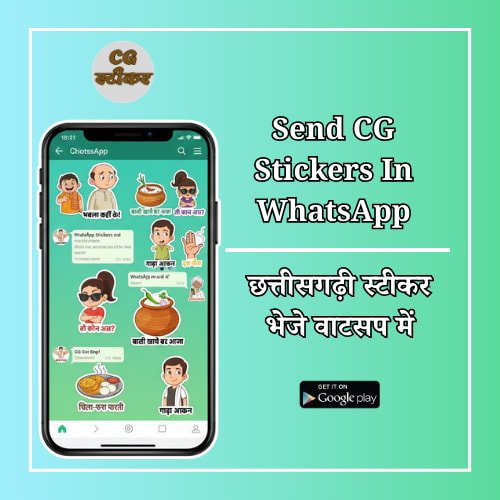
Are you a proud Chhattisgarhiya looking to spice up your WhatsApp chats? Do you want to share the unique humor and flavor of Chhattisgarh with your friends and family? Look no further! The CG Stickers App is your ultimate companion for sending vibrant, funny, and culturally relevant Chhattisgarhi stickers directly in WhatsApp.
In this simple guide, we’ll show you exactly how to download, install, and start sharing the best CG WhatsApp stickers in just a few taps!
Why You Need Chhattisgarhi Stickers for WhatsApp
WhatsApp is where most of us connect daily. But sometimes, text just isn’t enough to capture the true essence of a Chhattisgarhi conversation. Imagine sending:
- A hearty “हऊ पा!” (Hau Pa!) for agreement.
- A humorous “मूँड़ पीरत हे!” (Muda Pirat He!) when something is annoying you.
- An invitation with “बासी खाये बर आजा!” (Basi Khaye Bar Aaja!)
- And many more daily expressions that only a CG sticker can truly convey!
With the CG Stickers App, you get access to:
- Trending Chhattisgarhi memes and dialogues.
- Culturally relevant expressions for every mood.
- Easy one-tap integration with WhatsApp.
- The ability to create your OWN custom stickers! (More on this later!)
Ready to dive into the world of Chhattisgarhi WhatsApp stickers? Let’s get started!
Step-by-Step Guide: Sending CG Stickers in WhatsApp with the CG Stickers App
Step 1: Download the CG Stickers App
First things first, you need to get the app! goto play store and download the “CG Stickers” app.

Step 2: Explore & Add Sticker Packs to WhatsApp
Once installed, open the CG Stickers App. You’ll see a collection of awesome sticker packs.
- Browse the packs: Tap on different sticker packs to see all the individual stickers inside. You’ll find categories like “Daily Chatti Slang,” “Foodie Fun,” “Reaction Stickers,” and more!
- Add to WhatsApp: Found a pack you love? Tap the “Add to WhatsApp” (or a similar green WhatsApp icon) button next to the pack name.
- Confirm: WhatsApp will open and ask you to confirm if you want to add the sticker pack. Tap “Add.”
That’s it! The sticker pack is now successfully added to your WhatsApp.
Step 3: Start Sending CG Stickers in WhatsApp Chats!
Now for the fun part – sharing your Chhattisgarhi stickers!
- Open any chat in WhatsApp (individual or group).
- Tap on the emoji icon (usually to the left of the text input field).
- At the bottom of the emoji keyboard, you’ll see three icons: emojis, GIFs, and stickers. Tap the sticker icon (it looks like a peeled-back square).
- You’ll see a row of icons at the top of the sticker section. These are your sticker packs. Find the icon for the CG Stickers pack you just added.
- Tap on the desired sticker from the pack, and it will be sent instantly!
Create Your Own Custom Chhattisgarhi Stickers!
Did you know the CG Stickers App also lets you turn your own photos into Chhattisgarhi WhatsApp stickers? Capture local moments, famous Chhattisgarhi personalities, or inside jokes with your friends, and make them into personalised stickers!
- Go to the “My Stickers” or “Create Sticker” section within the CG Stickers App.
- Select a photo from your gallery.
- Use the intuitive editing tools to crop and perfect your sticker.
- Add it to your custom pack and share it on WhatsApp!
Get the CG Stickers App Today!
Don’t let your conversations be boring! Download the CG Stickers App today and bring the vibrant culture and humor of Chhattisgarh to your WhatsApp chats. It’s free, fun, and the best way to express yourself in true CG style!
Download the CG Stickers App on Google Play Store
व्हाट्सएप में छत्तीसगढ़ी स्टिकर कैसे भेजें: स्टेप-बाय-स्टेप गाइड
क्या आप अपने व्हाट्सएप चैट में छत्तीसगढ़ी मिठास घोलना चाहते हैं? CG Stickers App के साथ अब आप आसानी से अपने दोस्तों को बेहतरीन छत्तीसगढ़ी स्टिकर भेज सकते हैं।
स्टेप 1: ऐप डाउनलोड करें
सबसे पहले गूगल प्ले स्टोर पर जाएं और “CG Stickers” सर्च करके ऐप इंस्टॉल करें।
स्टेप 2: स्टिकर पैक को व्हाट्सएप में जोड़ें
- ऐप खोलें, यहाँ आपको बहुत सारे स्टिकर पैक दिखेंगे (जैसे: डेली स्लैंग, फूड, फनी मीम्स)।
- अपने पसंदीदा पैक के बगल में दिए गए “Add to WhatsApp” बटन पर क्लिक करें।
- व्हाट्सएप में ‘Add’ बटन दबाकर कन्फर्म करें।
स्टेप 3: स्टिकर भेजना शुरू करें
- अपना व्हाट्सएप खोलें और किसी भी चैट में जाएं।
- इमोजी (Emoji) आइकन पर टैप करें और नीचे दिए गए Sticker आइकन को चुनें।
- यहाँ आपको नया छत्तीसगढ़ी स्टिकर पैक दिखाई देगा। बस स्टिकर पर टैप करें और भेजें!
व्हाट्सएप मा छत्तीसगढ़ी स्टीकर कैसे भेजें: संगी मन बर जानकारी
जय जोहार संगी मन! अब आप मन अपन व्हाट्सएप मा छत्तीसगढ़ी गोठ-बात ला अउ मजेदार बना सकत हव। CG Stickers App के मदद ले आप मन अपन मनपसंद स्टीकर झटकुन भेज सकत हव।
स्टेप 1: ऐप ला डाउनलोड करव
प्ले स्टोर मा जाव अउ “CG Stickers” लिख के ऐप ला अपन मोबाइल मा डाउनलोड कर लव।
स्टेप 2: स्टीकर पैक ला व्हाट्सएप मा जोड़व
- ऐप ला खोलव, ओमा आप मन ला अलग-अलग कतकोन स्टीकर पैक मिलही (जैसे: बासी, चिला-फरा, अउ मजेदार गोठ)।
- जेउन पैक ला व्हाट्सएप मा जोड़े बर हे, ओकर तीर मा “Add to WhatsApp” बटन ला दबा दव।
- व्हाट्सएप मा जाके ‘Add’ बटन ला फेर ले दबा दव।
स्टेप 3: अब स्टीकर भेजव अउ मजा करव
- अपन व्हाट्सएप खोलव अउ कोनो भी संगी के चैट मा जाव।
- जहाँ ले आप मन इमोजी भेजथौ, ओही मेर Sticker वाले निशान ला छुव।
- ओमा आप मन ला अपन छत्तीसगढ़ी स्टीकर पैक दिखही। बस अपन मनपसंद स्टीकर ला दबा दव अउ भेज दव!
Check our other App:
– Time Countdown App